Visualizzazione post con etichetta catturare. Mostra tutti i post

lunedì 27 ottobre 2014

PicPick 4.0.0

Per effettuare il download di PicPick 4.0.0 cliccare QUI.


Picpick
E' un semplice programma molto utile e versatile , per catturare schermate del nostro desktop, munito di un interfaccia semplice e intuitiva non necessita di nessuna installazione ed è di libero utilizzo.


Caratteristiche:

Acquisisce
Full Screen (supporto per doppio monitor)
Active Window
Finestra di controllo (Scorrere una pagina automaticamente)
Regione, fissa Regione
Mano libera
Ripete Ultimo Screen Capture
Image Editor
E 'molto simile a Microsoft Paint, ma si può fare molte cose di più.
Vari effetti, come la selezione di opacità, sfocatura, nitidezza, luminosità, contrasto, tonalità, saturazione, flip, ruotare e ecc
Tavolozza dei colori
Schermo Goniometro
Mirino
Schermo Whiteboard.


Changelog:


v4.0.0 (2014-10-25)
  • No bundle offer in the free version
  • Improved Ribbon Interface
  • Improved Selection Tool
  • Improved Text Tool
  • Added Stamps
  • Added Magnify Effect
  • Added Color Replacement Fill
  • Improved Capture Bar
  • Improved Color Palette
  • Language updates
  • Minor bugs are fixed

NON NECESSITA INSTALLAZIONE

Home Page

Sistemi operativi: Windows


lunedì 5 maggio 2014

PicPick 3.3.3

Per effettuare il download di PicPick 3.3.3 cliccare QUI.


Picpick
E' un semplice programma molto utile e versatile , per catturare schermate del nostro desktop, munito di un interfaccia semplice e intuitiva non necessita di nessuna installazione ed è di libero utilizzo.


Caratteristiche:

Acquisisce
Full Screen (supporto per doppio monitor)
Active Window
Finestra di controllo (Scorrere una pagina automaticamente)
Regione, fissa Regione
Mano libera
Ripete Ultimo Screen Capture
Image Editor
E 'molto simile a Microsoft Paint, ma si può fare molte cose di più.
Vari effetti, come la selezione di opacità, sfocatura, nitidezza, luminosità, contrasto, tonalità, saturazione, flip, ruotare e ecc
Tavolozza dei colori
Schermo Goniometro
Mirino
Schermo Whiteboard.


Changelog:

v3.3.3 (2014-05-03)

  • Fixed an issue of uploading dropbox
  • Fixed an issue of whiteboard
  • Language updates
  • Minor bugs are fixed

NON NECESSITA INSTALLAZIONE

Home Page

Sistemi operativi: Windows


martedì 15 aprile 2014

SCREEN2EXE 3.6

Per effettuare il download di SCREEN2EXE 3.6 cliccare qui.


Ottimo programma per catturare la schermata è visualizzata sul desktop e salvarla sotto forma di file. EXE, SWF, AVI, FLV e MP4.


S.O. : Windows 2000/XP/2003/Vista/7/8
Licenza free 


martedì 28 gennaio 2014

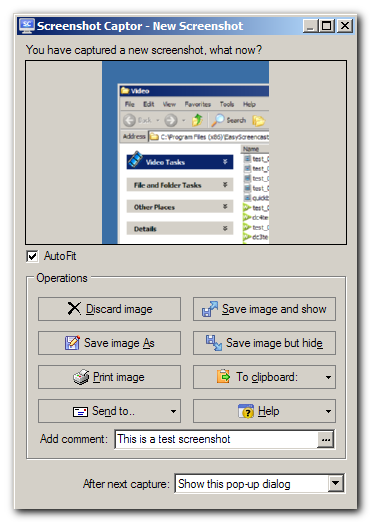
Screenshot Captor 4.08

Per il download di Screenshot Captor 4.08 cliccare qui.


Screenshot Captor permette di catturare ciò che è visualizzato sullo schermo.


Le sue caratteristiche principali sono:
  • Optimized for taking lots of screenshots with minimal intervention; stays out of your way until you need it.
  • Super easy to add and edit callout arrows and text boxes.
  • - Easy automatic or on-demand uploading of screenshots to image hosting services; easy emailing of screenshots to your friends and colleagues.
  • - Take snapshots from webcams; record video with the ESR addon.
  • - New optional quick-capture docking bar and post-capture action dialog.
  • - Full set of scanner acquisition tools and scanner image correction.
  • - Perfect capture of Windows 7 partial transparency effects.
  • - The most powerful scrolling capture tool in the field.
  • - Great special effects, including automatic active window enhancement, ragged edge splicing, pixelation, smart text removal, and many more.
  • Smart autonaming of files, easy renaming and format conversion; automatic image file versioning.
  • Ability to embed textual comments in files or add attractive captions to images and printouts.
  • Unsurpassed multi-monitor support and lots of capture modes: Multimon (multiple monitors), Desktop, Active Window, Region, Windows Object, Scrolling Capture. Each mode has a customizable hotkey for quick access.
  • Unsurpassed support for 3rd party user configurable tools, including file browsers and image editors; extend the program to do whatever you need by interfacing it with other programs.
  • Sidebar thumbnail file browser provides full shell operations, drag and drop support, and right-click actions on screenshots.
  • Deluxe thumbnail maker and watermarker.

Sistema Operativo: Windows 2000/2003/Vista/7/8.
Licenza: Freeware.

lunedì 7 ottobre 2013

PicPick 3.2.8

Per effettuare il download di PicPick 3.2.8 cliccare QUI.


Picpick
E' un semplice programma molto utile e versatile , per catturare schermate del nostro desktop, munito di un interfaccia semplice e intuitiva non necessita di nessuna installazione ed è di libero utilizzo.


Caratteristiche:

Acquisisce
Full Screen (supporto per doppio monitor)
Active Window
Finestra di controllo (Scorrere una pagina automaticamente)
Regione, fissa Regione
Mano libera
Ripete Ultimo Screen Capture
Image Editor
E 'molto simile a Microsoft Paint, ma si può fare molte cose di più.
Vari effetti, come la selezione di opacità, sfocatura, nitidezza, luminosità, contrasto, tonalità, saturazione, flip, ruotare e ecc
Tavolozza dei colori
Schermo Goniometro
Mirino
Schermo Whiteboard.


Changelog:

v 3.2.8 (2013-10-06)
  • Added Facebook Connect
  • Added Watermark sample images
  • Language updates
  • Minor bugs are fixed

NON NECESSITA INSTALLAZIONE

Home Page

Sistemi operativi: Windows


martedì 24 settembre 2013

WebShot 1.9.3.0

Per effettuare il download di WebShot 1.9.3.0 cliccare qui.


Ottimo programma che ci da la possibilità di andare a catturare completamente le immagini del nostro desktop, per fare ciò basta andare a digitare nell'apposito spazio l'indirizzo della pagina da catturare e lui la catturerà.


What's new in WebShot 1.9.3.0


June 22nd, 2013


· Added /processes command line parameter
· Fixed valid characters being removed from filenames


Sistemi Operativi: Windows 2000\2003\Xp\Vista/7.
Programma free 


lunedì 20 maggio 2013

PicPick 3.2.5

Per effettuare il download di PicPick 3.2.5 cliccare QUI.


Picpick
E' un semplice programma molto utile e versatile , per catturare schermate del nostro desktop, munito di un interfaccia semplice e intuitiva non necessita di nessuna installazione ed è di libero utilizzo.


Caratteristiche:

Acquisisce
Full Screen (supporto per doppio monitor)
Active Window
Finestra di controllo (Scorrere una pagina automaticamente)
Regione, fissa Regione
Mano libera
Ripete Ultimo Screen Capture
Image Editor
E 'molto simile a Microsoft Paint, ma si può fare molte cose di più.
Vari effetti, come la selezione di opacità, sfocatura, nitidezza, luminosità, contrasto, tonalità, saturazione, flip, ruotare e ecc
Tavolozza dei colori
Schermo Goniometro
Mirino
Schermo Whiteboard.


Changelog:


v3.2.5 (2013-05-19)
  • Fixed an issue of Save All
  • Fixed an issue of Windows 8 compatibility
  • Fixed an issue of Send to Skype
  • Language updates
  • Minor bugs are fixed
NON NECESSITA INSTALLAZIONE

Home Page

Sistemi operativi: Windows


domenica 7 aprile 2013

PicPick 3.2.4

Per effettuare il download di PicPick 3.2.4 cliccare QUI.


Picpick
E' un semplice programma molto utile e versatile , per catturare schermate del nostro desktop, munito di un interfaccia semplice e intuitiva non necessita di nessuna installazione ed è di libero utilizzo.


Caratteristiche:

Acquisisce
Full Screen (supporto per doppio monitor)
Active Window
Finestra di controllo (Scorrere una pagina automaticamente)
Regione, fissa Regione
Mano libera
Ripete Ultimo Screen Capture
Image Editor
E 'molto simile a Microsoft Paint, ma si può fare molte cose di più.
Vari effetti, come la selezione di opacità, sfocatura, nitidezza, luminosità, contrasto, tonalità, saturazione, flip, ruotare e ecc
Tavolozza dei colori
Schermo Goniometro
Mirino
Schermo Whiteboard.


Changelog:

v3.2.4 (2013-04-06)
  • Added Output “Send to Skype”
  • Fixed an issue of Ruler location on dual environment.
  • Fixed an issue of Capture Bar location
  • Language updates
  • Minor bugs are fixed
NON NECESSITA INSTALLAZIONE

Home Page

Sistemi operativi: Windows

lunedì 4 marzo 2013

PicPick 3.2.3

Per effettuare il download di PicPick 3.2.3 cliccare QUI.


Picpick
E' un semplice programma molto utile e versatile , per catturare schermate del nostro desktop, munito di un interfaccia semplice e intuitiva non necessita di nessuna installazione ed è di libero utilizzo.


Caratteristiche:

Acquisisce
Full Screen (supporto per doppio monitor)
Active Window
Finestra di controllo (Scorrere una pagina automaticamente)
Regione, fissa Regione
Mano libera
Ripete Ultimo Screen Capture
Image Editor
E 'molto simile a Microsoft Paint, ma si può fare molte cose di più.
Vari effetti, come la selezione di opacità, sfocatura, nitidezza, luminosità, contrasto, tonalità, saturazione, flip, ruotare e ecc
Tavolozza dei colori
Schermo Goniometro
Mirino
Schermo Whiteboard.


Changelot:

v3.2.3 (2013-03-03)
  • Fixed an issue of preset of highlight rectangles.
  • Fixed an issue of ribbon interface design
  • Fixed an issue of message “Invalid Pointer Operation”
  • Language updates
  • Minor bugs are fixed
NON NECESSITA INSTALLAZIONE

Home Page

Sistemi operativi: Windows

venerdì 8 giugno 2012

Screenshot Captor 3.08.01

Screenshot Captor 3.08.01


Screenshot Captor permette di catturare ciò che è visualizzato sullo schermo.

Le sue caratteristiche principali sono:

  • Optimized for taking lots of screenshots with minimal intervention.
  • - Full set of scanner acquisition tools and scanner image correction.
  • - Perfect capture of Windows 7 partial transparency effects.
  • - Easy automatic or on-demand uploading of screenshots to a wide variety of image hosting services (imageshack, flickr, ftp, etc.).
  • Smart autonaming of files, and ability to embed textual comments in files.
  • Excellent multi-monitor support.
  • Highly configurable to make it work the way you want it to; stays out of your way in the system tray.
  • Lots of capture modes: Multimon (multiple monitors), Desktop, Active Window, Region, Windows Object. Each mode has a hotkey for quick access.
  • Unique Cool Effects, including automatic active window enhancement (see pictures below).
  • Unsurpassed support for 3rd party user configurable tools, including file browsers and image editors; extend the program to do whatever you need by interfacing it with other programs.
  • Slimline sidebar file browser provides full shell operations.
  • Optional automatic image file versioning.
  • Autoscroll capture for windows too big for screen.
  • Deluxe thumbnail maker.
  • Quick PostCapture PopUp Dialog.
  • Quick Screenshot Emailer Menu.

Sistema Operativo: Windows 2000/2003/Vista/7/8.
Licenza: Freeware.

Screenshot Captor 3.08.01

Screenshot Captor 3.08.01


Screenshot Captor permette di catturare ciò che è visualizzato sullo schermo.

Le sue caratteristiche principali sono:

  • Optimized for taking lots of screenshots with minimal intervention.
  • - Full set of scanner acquisition tools and scanner image correction.
  • - Perfect capture of Windows 7 partial transparency effects.
  • - Easy automatic or on-demand uploading of screenshots to a wide variety of image hosting services (imageshack, flickr, ftp, etc.).
  • Smart autonaming of files, and ability to embed textual comments in files.
  • Excellent multi-monitor support.
  • Highly configurable to make it work the way you want it to; stays out of your way in the system tray.
  • Lots of capture modes: Multimon (multiple monitors), Desktop, Active Window, Region, Windows Object. Each mode has a hotkey for quick access.
  • Unique Cool Effects, including automatic active window enhancement (see pictures below).
  • Unsurpassed support for 3rd party user configurable tools, including file browsers and image editors; extend the program to do whatever you need by interfacing it with other programs.
  • Slimline sidebar file browser provides full shell operations.
  • Optional automatic image file versioning.
  • Autoscroll capture for windows too big for screen.
  • Deluxe thumbnail maker.
  • Quick PostCapture PopUp Dialog.
  • Quick Screenshot Emailer Menu.

Sistema Operativo: Windows 2000/2003/Vista/7/8.
Licenza: Freeware.

lunedì 28 maggio 2012

Spy Screen 3.5

Spy Screen 3.5


Questo semplice programma c' è di notevole aiuto quando vogliamo sapere cosa accade sul nostro pc quando siamo assenti.
Cattura degli screenshots del nostro desktop ad intervalli regolari e li salva cosi che al nostro ritorno possiamo vedere cosa è accaduto.


Programma free.
Sistemi Operativi: Windows 2000 - xp - Vista- 7

Spy Screen 3.5

Spy Screen 3.5


Questo semplice programma c' è di notevole aiuto quando vogliamo sapere cosa accade sul nostro pc quando siamo assenti.
Cattura degli screenshots del nostro desktop ad intervalli regolari e li salva cosi che al nostro ritorno possiamo vedere cosa è accaduto.


Programma free.
Sistemi Operativi: Windows 2000 - xp - Vista- 7

martedì 22 maggio 2012

SCREEN2EXE 3.2

SCREEN2EXE 3.2


Ottimo programma per catturare la schermata è visualizzata sul desktop e salvarla sotto forma di file. exe.

Novità introdotte in questa versione:

Add new feature that showing rectangle while recording part of the screen. 


S.O. : Windows 2000/XP/2003/Vista.
Licenza free

SCREEN2EXE 3.2

SCREEN2EXE 3.2


Ottimo programma per catturare la schermata è visualizzata sul desktop e salvarla sotto forma di file. exe.

Novità introdotte in questa versione:

Add new feature that showing rectangle while recording part of the screen. 


S.O. : Windows 2000/XP/2003/Vista.
Licenza free

lunedì 23 aprile 2012

Video DVD Maker Free 3

Video DVD Maker Free 3


Video DVD Maker Free by Protectedsoft è un tool per catturare e masterizzare i propri filmati su CD/DVD.

Sistema Operativo: Windows 2000 / XP / 2003 / Vista/ 7
Programma free

Video DVD Maker Free 3

Video DVD Maker Free 3


Video DVD Maker Free by Protectedsoft è un tool per catturare e masterizzare i propri filmati su CD/DVD.

Sistema Operativo: Windows 2000 / XP / 2003 / Vista/ 7
Programma free

mercoledì 28 marzo 2012

WebShot 1.9.1.1

WebShot 1.9.1.1:  download


Ottimo programma che ci da la possibilità di andare a catturare completamente le immagini del nostro desktop, per fare ciò basta andare a digitare nell'apposito spazio l'indirizzo della pagina da catturare e lui la catturerà.

Latest Version 1.9.1.1 - October 10th, 2012
Fixed /bwidth & /bheight when using chromium
Fixed some DLL definitions


Sistemi Operativi: Windows 2000\2003\xp\vista/7.
Programma free